Language Server Protocol (LSP) Explained: What It Is, How It Works, and Why It Matters
Nihesh Rachakonda••6 min read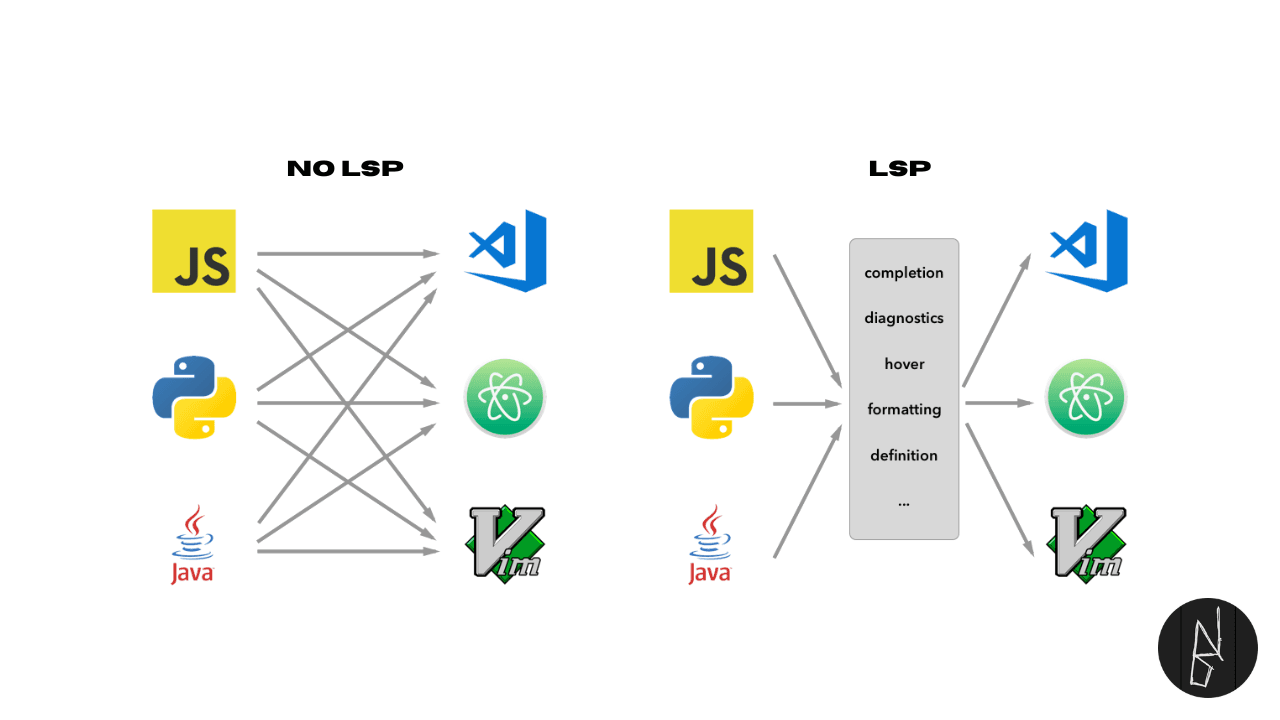
If you have used auto-complete, go-to-definition, rename symbol, or inline diagnostics in a modern editor, you have likely used an LSP-powered workflow.
LSP stands for Language Server Protocol. It changed developer tooling by separating editor UI from language intelligence.
This post explains:
- what LSP is
- how LSP works
- how AI coding tools use it
- why older approaches struggled
- concrete examples you can relate to
What is LSP?
Language Server Protocol (LSP) is a standard communication protocol between:
- a client (your editor/IDE), and
- a language server (a process that understands a specific language deeply)
Instead of every editor building language support from scratch, editors speak one protocol and reuse language servers.
Think of it as:
- editor = frontend/UI
- language server = backend intelligence
- LSP = API contract between them
Why LSP was needed
Before LSP became common, language tooling was fragmented.
Each editor had to build and maintain separate support for each language. That meant:
- duplicate effort
- inconsistent behavior across editors
- uneven quality
- slow updates
For example, teams using VS Code, Vim/Neovim, Emacs, Sublime Text, and Atom often got very different experiences for the same language.
LSP solved that by giving all editors a shared protocol for language features.
How LSP works (simple flow)
When you open a file, this usually happens:
- Editor starts a language server process (for example, TypeScript server or Pyright).
- Editor sends project/file context to the server.
- Server builds understanding (symbols, types, references, diagnostics).
- As you type, editor sends incremental updates.
- Server responds with:
- completions
- errors/warnings
- definitions/references
- rename edits
- code actions
- Editor renders results in UI.
The protocol itself is generally message-based (JSON-RPC over stdio or sockets), but as a user you just feel fast and consistent language intelligence.
Common LSP features you use daily
- Auto-complete with context-aware suggestions
- Go to definition / declaration
- Find references
- Hover type info / docs
- Rename symbol across files safely
- Diagnostics (errors, warnings, hints)
- Code actions (quick fixes, imports, refactors)
- Formatting integration (via LSP or companion tools)
These are no longer tied to one editor vendor.
LSP and AI editors: same foundation, new UX
This is the part many people miss: modern AI coding tools are not replacing LSP; they often build on top of it.
Tools such as AI-native editors and coding assistants still need reliable language intelligence for:
- symbol resolution
- project-wide references
- diagnostics context
- safe rename/refactor boundaries
- workspace-aware code actions
LSP is frequently the layer that provides this structured context.
Why this matters for AI workflows
AI suggestions become much better when grounded in real code intelligence.
Without LSP-like context, an AI tool may generate code that looks correct but breaks project semantics. With LSP context, tools can:
- navigate definitions accurately
- detect type or symbol conflicts earlier
- perform safer edits across multiple files
- reduce hallucinated imports and broken refactors
So the better way to think about it is:
- LSP = trusted code intelligence layer
- AI = reasoning/generation layer
- great DX = both working together
Traditional methods (and why they were weaker)
Before LSP, language support was typically done in one of these ways:
1) Regex/text-based plugins
Examples:
- syntax-only plugins in Vim/Sublime
- editor snippets + keyword matching
Limitations:
- no deep semantic understanding
- fragile with large codebases
- poor rename/refactor safety
2) Editor-specific language plugins/APIs
Examples:
- custom VS Code extension language logic only for VS Code
- custom JetBrains plugin implementations per language integration path
Limitations:
- repeated implementation across editors
- inconsistent feature parity
- high maintenance cost
3) Tag/index based navigation
Examples:
ctags,etags, static symbol indexers
Limitations:
- good for navigation, weak for type-aware refactoring
- no real-time diagnostics at modern scale
- hard with dynamic/complex language features
4) Build-tool-only feedback loops
Examples:
tsc,mypy,javac,go build,eslintonly through terminal
Limitations:
- useful but not interactive while typing
- slower “edit -> save -> run -> read output” loop
These methods are still useful in specific scenarios, but for day-to-day developer experience, LSP is generally superior.
Real-world example: TypeScript
Without LSP-style tooling:
- you edit code
- run
tsc - parse terminal errors
- manually find symbol usages
With LSP:
- diagnostics appear while typing
- “rename symbol” updates references across files
- go-to-definition and hover type are instant
That reduces context-switching and mistake risk.
Another example: Python
Using Pyright (LSP server) + your editor:
- you get type diagnostics in editor
- import fixes and code actions
- jump-to-definition across project
Compare that to terminal-only flake8 + mypy loops: still valuable, but slower and less interactive during coding.
Does LSP replace compilers, linters, and formatters?
Not exactly.
LSP complements them.
- Compiler: source of truth for builds
- Linters: policy/style/static checks
- Formatter: code style consistency
- LSP: editor-time interactive intelligence
Best setup is layered:
- LSP for fast feedback while coding
- CI checks for strict enforcement
LSP ecosystem examples
Popular language servers:
- TypeScript:
typescript-language-server/ tsserver-backed flows - Python:
pyright,pylsp - Go:
gopls - Rust:
rust-analyzer - C/C++:
clangd
Popular clients/editors:
- VS Code
- Neovim
- Emacs
- Sublime Text
- Helix
Same protocol, different editor UX.
Trade-offs and caveats
LSP is great, but not magic:
- Some servers are heavy on memory/CPU in big monorepos.
- Feature quality depends on specific server quality.
- Dynamic languages can still have ambiguity.
- Setup can require tuning (root detection, virtual envs, formatting pipelines).
Still, for most teams, the productivity gain is substantial.
When traditional methods are still useful
Traditional tools still matter:
- CLI linters/compilers in CI are mandatory.
ctagscan be fast for basic navigation in very constrained environments.- Minimal editors in remote boxes may skip full LSP.
But for modern local development, LSP gives a better default experience.
Final takeaway
LSP succeeded because it standardized language intelligence as a reusable service.
Instead of building N language integrations for N editors, language ecosystems can invest in one strong server and benefit everyone.
And now the same principle extends beyond classic editors: the same language intelligence backbone is helping power modern AI-assisted coding experiences too.